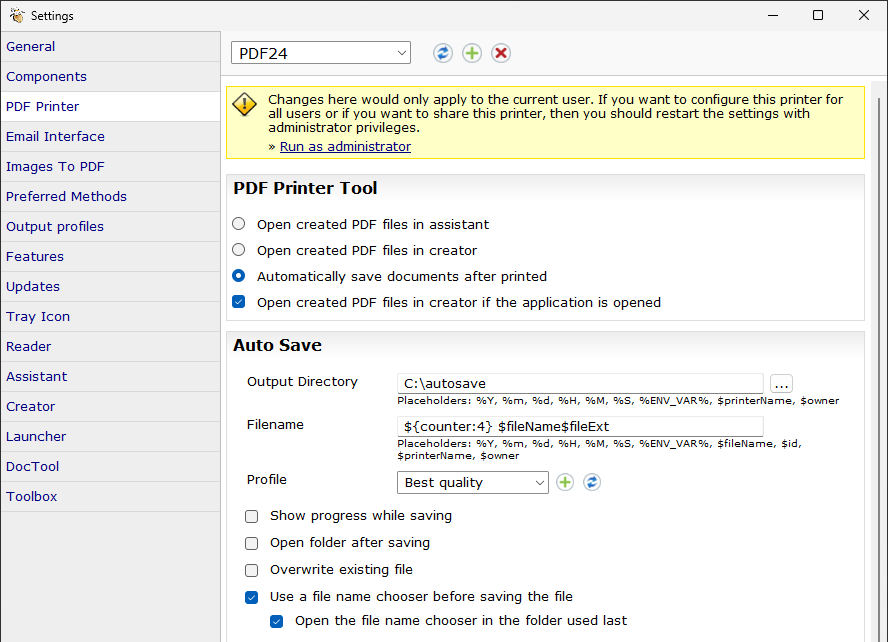
With automatic saving, the PDF24 printer saves every print job as a file without asking, for example invoices from your merchandise management system straight into a folder. Since version 11.34.0 you can set the file names even more precisely. New placeholders for the field "Filename":
- $fileExt: the extension of the printed document. "$fileName$fileExt" gives, for example, "Report.docx.pdf", so you can see at once where the PDF comes from.
- $counter: a running number, separately for each printer and user. With ${counter:4} it has at least four digits, for example 0001.
- $ms: the milliseconds. Together with the time, even files from the same second get different names.
- $clipboard: the first line of text on the clipboard, for example an order number you copy before printing. It stays empty when saving with the PDF24 Windows Service.
If you prefer to decide where each file goes, turn on "Use a file name chooser before saving the file". New is the setting "Open the file name chooser in the folder used last": the save dialog then opens in the folder where you last saved with this printer, instead of always in the configured folder.
All placeholders and settings are described in the manual.