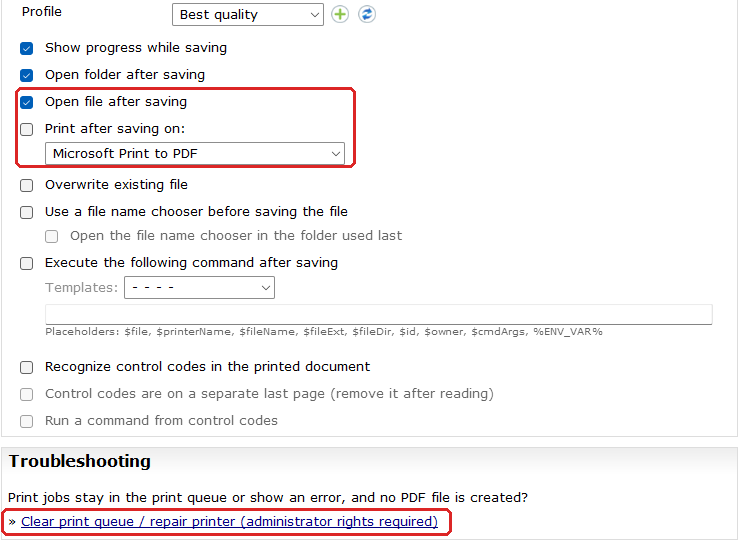
With automatic saving, the PDF24 printer saves every print job as a file without asking. Since version 11.35.0 it can do even more for you afterwards. In the settings on the page "PDF Printer" there are two new options:
- "Open file after saving": the finished PDF opens right away so you can check it.
- "Print after saving on:" a printer of your choice, preset to the default printer. This way every invoice, for example, goes into the archive as a PDF and onto paper at the same time. A PDF24 printer is never used for this; PDF24 then reports that the file was saved but not printed.
A file name that already ends with the extension, such as "Invoice.pdf", does not get it a second time, and if a program sends no path, $fileDir saves to the desktop instead of failing.
Repair the printer: If print jobs get stuck in the queue or no PDF is created, the new section "Troubleshooting" on the same page helps: "Clear print queue / repair printer" resumes a paused printer, deletes stuck jobs and restarts the print spooler and the PDF24 service. Administrator rights are required. Before, this meant manual work in Windows.
File name in the Assistant: If you save with the PDF Printer Assistant, set the suggested name in its settings under "File name when saving", also for each file when several are saved into a folder. The placeholders of automatic saving apply, for example date and time, $owner for the signed-in user and $fileName for the previous suggestion.
Also fixed: landscape print jobs come out in landscape again on the classic printer "PDF24", text printed for example via FinePrint or with the option "Outline" is no longer missing, and print jobs are no longer lost, even during an update.