Home › Forums › PDF24 Creator › Join files in PDF24 Assistant via shortcut or command line
Tagged: file join, PDF24 Assistent
- This topic has 1 reply, 2 voices, and was last updated 1 day, 17 hours ago by PDF24 Support.
-
AuthorPosts
-
2025-02-08 at 10:00 #63802some53Participant
Hi,
I have a repetitive task of joining pdf file and saving them using PDF24 assistant. For this I have to click on the join button then on the save as PDF button. Currently I automate this using AHK mouse movement but this is unreliable as I am blindly clicking on the window position.
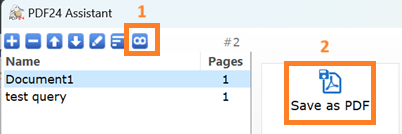 [url=https://postimages.org/][img]https://i.postimg.cc/DfQmmfNQ/pdf24.jpg[/img][/url]
I was wondering if there is any Shortcut key to join all the files available on the pdf24 assistant and another shortcut key to save them. A command line will also help but there is not input directory for the pdf. The pdf files are generated by directly printing using pdf24 printer. so I can't use the following script,
@echo off
set "output=C:\path\to\output.pdf"
set "input_dir=C:\path\to\pdfs"
pdf24-assistant --merge -o "%output%" "%input_dir%\*.pdf"
or is there a way to merge the pdf that is on the PDF24 assistant window even without input_dir? I would really appreciate any help or suggestions on this. Thank you.
2026-10-30 at 15:54 #65311PDF24 SupportModeratorHello,
sorry for the late reply. The PDF24 Assistant has no keyboard shortcuts for Join files and Save as PDF, and its file list cannot be controlled from the command line (a command
pdf24-assistant --mergedoes not exist). Keyboard shortcuts in the Assistant are on our to-do list.For a repetitive task like yours, you can do it without the Assistant: let the PDF printer save the files automatically into a folder and then join this folder with the command line.
- In the PDF24 Settings open PDF Printer. If you still want the Assistant for your normal printing, first add a second printer with Install a PDF printer (e.g. "PDF24 Join") and select it.
- Under PDF Printer Tool choose Automatically save documents after printed and under Auto Save set the Output Directory, e.g.
C:\Join\in. The default file name starts with the date and time, so the files are sorted in the order they were printed. - Print your documents to this printer, then run:
"C:\Program Files\PDF24\pdf24-DocTool.exe" -join -profile special/justAssemble -sort -expandDirs -includeFileExtensions .pdf -outputFile "C:\Join\output.pdf" "C:\Join\in"-expandDirstakes all files of the folder,-includeFileExtensions .pdfonly the PDF files,-sortsorts them by name and-profile special/justAssembleonly joins the files without showing a dialog. Afterwards empty the folderC:\Join\in, so that the next run only joins the new files.The command line options are described in the manual:
https://creator.pdf24.org/manual/11/#1115-join-input-files-and-create-an-output-pdf-file
https://creator.pdf24.org/manual/11/#1111-general-format-and-optionsJoining also works online: https://tools.pdf24.org/en/merge-pdf
-
AuthorPosts
- You must be logged in to reply to this topic.