Until now, on Windows 11 you had to click "Show more options" after a right-click to find PDF24. Since version 11.33.0, "PDF24" appears directly in the new Explorer context menu, for one file, for several selected files and for folders. One click opens the PDF24 File Tools with your selection, where you can, for example, merge or compress the files.
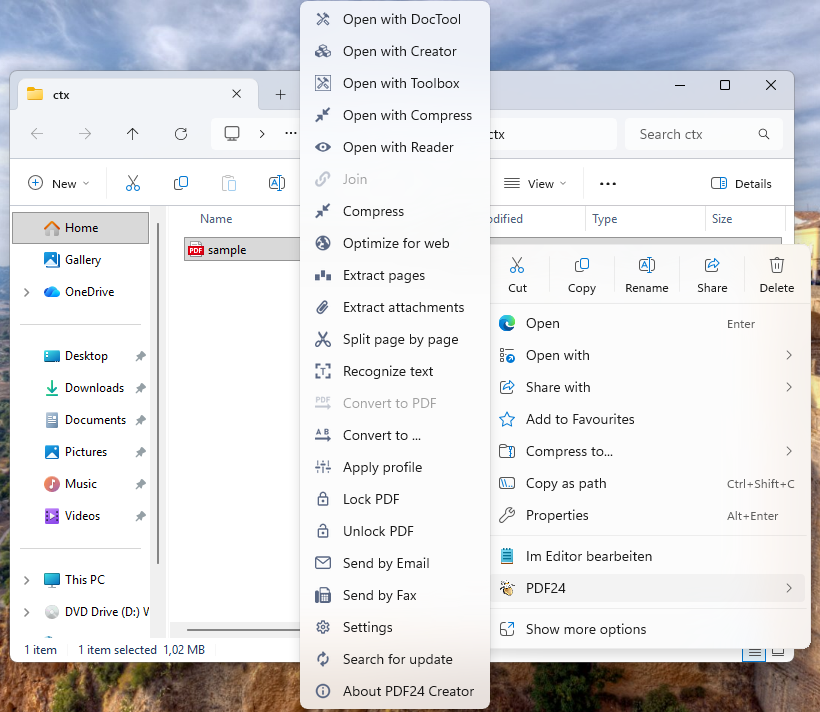
Prefer a submenu with the individual functions (merge, compress, open in the Creator or Reader and more)? Then choose the option "Use shell extension DLL" during installation. The setup option "Extend context menu" switches the entry on and off. Details are in the manual.
Tip: When you merge files, the result can now get the name of the first file. Turn on "Use the name of the first file when merging files" under Settings > DocTool. The first file is never overwritten.