Since version 11.34.0, PDF24 Reader saves you a few steps:
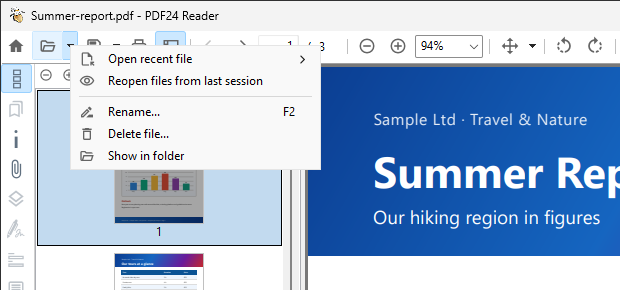
- Rename, delete, show in folder: In the file menu (the arrow at the "Open" button) you find "Rename..." (also with F2), "Delete file..." (moves the file to the recycle bin) and "Show in folder". No need to switch to the Explorer.
- The view stored in the PDF: The Reader opens a PDF the way the file specifies, for example set with the tool "Edit viewer preferences" of the Toolbox: single page, two pages or two pages with cover page, and the sidebar with bookmarks, thumbnails or attachments. This only applies to that file, your setting in the Reader stays.
- Undo in form fields: Ctrl+Z undoes your input in a form field character by character, Ctrl+Y redoes it. Date fields keep showing the formatted value afterwards.
- More print jobs with real text: When the Reader prints to the driverless PDF24 printer, fonts and text are now also kept with pages per sheet, booklets, posters, headers and footers, custom scaling and other paper, and the file stays small. How this works is explained in the post Smaller PDF files when printing from PDF24 Reader.
In addition, the page number stays in the toolbar when the window gets narrower, and large PDFs scroll much more smoothly with the navigation shown.