If you look after PDF24 Creator for several users, version 11.34.0 means less work:
- Toolbox on terminal servers: The setup only leaves out the bundled WebView2 when a WebView2 runtime is installed for all users. Before, a runtime that only the installing user had also counted; on terminal servers the Toolbox then did not start for the other users.
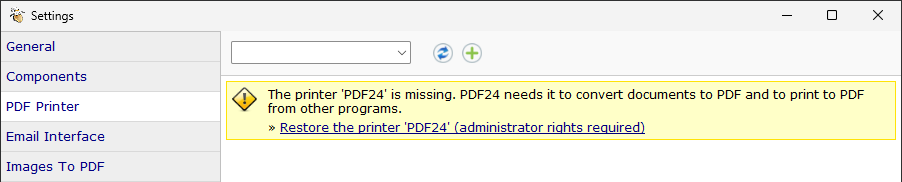
- Restore the printer "PDF24": If the printer "PDF24" is missing because it was deleted or deselected during installation, the page "PDF Printer" of the settings shows a note with "Restore the printer 'PDF24'". It sets the printer up again like the setup (administrator rights required). Before, only running the setup again helped.
- Crash data for the support: If a PDF24 program crashes, a minidump and a short text file with program, version, Windows and crash location are left in %LOCALAPPDATA%\PDF24\CrashDumps. These files help the support, the ten newest are kept.
- Event log: If the PDF24 service runs under its own logon account, its messages are readable in the Windows event log.
- CCleaner: The setup removes "sleep mode" entries of CCleaner from the PDF24 programs. With them, no PDF24 program started any more, even after reinstalling.
- Updater and firewall: If the updater cannot reach creator.pdf24.org, the message names the server and the program pdf24-Updater.exe that a firewall has to allow.
- Clearer setup option: Under "Extend shell context menu" the option is now called "PDF24 as a submenu with all functions" instead of "Use shell extension DLL".
On Windows 10, Windows 11 21H2 and Windows Server 2016 to 2022, the update also connects the classic PDF24 printers to the port \\.\pipe\PDFPrint again, with which they print there; version 11.33.0 had moved them to a port these Windows versions do not serve. All options for deploying in a company are in the manual.