Edit PDF: shape outline disappears with the opacity setting

Home › Forums › PDF24 Toolbox › Edit PDF: shape outline disappears with the opacity setting

Viewing 2 posts - 1 through 2 (of 2 total)
  • Author
    Posts
  • #63878
    iarnhem
    Participant

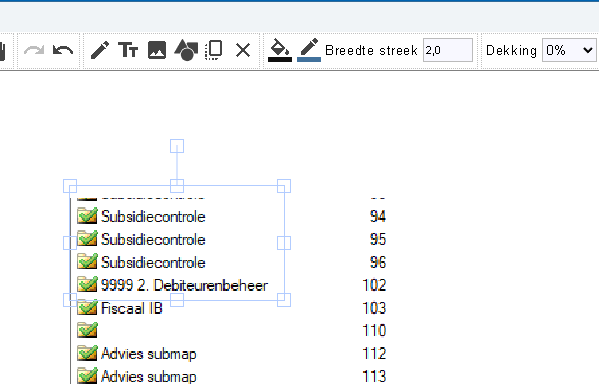
    i'm editing a pdf file and put a shape to highlight a part. By default that shape hides te text to highlight, I can adjust it, by moving the opacity slider from 100 to 0. It would be great if this is remembered by a settingsmenu. then after adding the shape and altering opacity the shape is completely invisible, how can i get the outsidelines of the shape to remain visible.

    shape is visible when selected

    now not selected and thus not visible:

    #65295
    PDF24 Support
    Moderator

    Hello,

    sorry for the late reply. In Edit PDF of PDF24 Toolbox, Opacity always applies to the whole shape, fill and outline together, so the outline fades with it.

    A frame with only an outline works online: https://tools.pdf24.org/en/edit-pdf - there, rectangles and circles are drawn as an outline without fill, and the small menu at the selected shape has a No fill button.

    Thank you for the suggestion to set the opacity of fill and outline separately in the Toolbox, we will add it to our list.

Viewing 2 posts - 1 through 2 (of 2 total)
  • You must be logged in to reply to this topic.