- This topic has 8 replies, 1 voice, and was last updated 1 day, 19 hours ago by PDF24 Support.
-
AuthorPosts
-
2021-01-14 at 18:56 #60440Phil van KleurParticipant
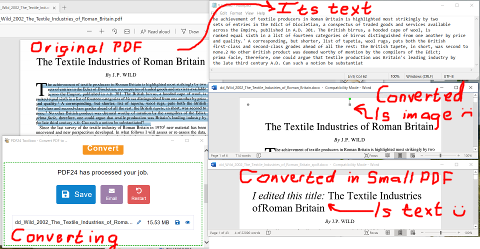
The screenshot below shows stages in converting a PDF to Word and attempting to edit the result. Although the PDF is text, the Word version has come across as images. I'm very confused by this. It may be that I'm using the wrong settings, so I've put up a temporary copy of the PDF at http://www.filedropper.com/ddwild2002thetextileindustriesofromanbritain . It's an academic paper with book-style pagination, containing text and a few diagrams. I'd be very grateful for advice.
Below, I explain how I converted it in PDF24 and why the result isn't what I hoped for. In the top-left corner of the screenshot, I opened my local copy in Microsoft Edge, using this just as a display tool. You can see that I've selected some text. To prove that it is text, in the top-right corner, I paste this into Notepad. The result may be a bit small to read, but text definitely has been copied from the PDF.
In the bottom-left corner is what PDF24 shows after I converted the original PDF to Word.
Below the Notepad window is the result of opening this in Word. Note the green square and red circle at the top of the page. This shows that Word thinks the page is an image.
Under that window is another version of the PDF opened in Word. This one was converted with a converter called SmallPDF. You can see that it is text, because I was able to edit the title. I have also converted the original PDF with Acrobat DC, Word's PDF importer, and Kofax Power PDF. They all generate Word files containing text I can edit. Only PDF24 generates images. It does this regardless of whether I also ask it to OCR the PDF: but none of the other converters needed me to do that.
I can't find a version number on PDF24, but it's running on Windows 10 and was installed less than a month ago.
Thanks!
 2021-01-15 at 17:58 #64473Phil van KleurParticipant
This is similar to my question at https://help.pdf24.org/en/questions/question/why-does-ocring-and-converting-to-docx-leave-the-docx-file-as-images/ , except that there, the PDF being converted was images of text. Here, it's text, as shown by my being able to copy from it. As PDF24 gave me images in both cases, I wonder whether it is designed to do that if it can't work out how to convert the PDF to Word text?
2021-01-18 at 10:02 #60442Stefan ZieglerKeymasterI think that the file is converted as text, but there is still a background image involved in the file but you should also be able to select and copy the text
2021-01-19 at 12:31 #64474Phil van KleurParticipantWhen I put my mouse over the Word file, at the cursor is a cross made of four arrows. If I click on the mouse and try to select text, it moves the entire page as an image. If I do Control-A to select the entire file, Word freezes. So there doesn't seem to be a way to select the text. Could you try converting the file I uploaded, and see whether you can do so?
2021-01-19 at 12:32 #64475Phil van KleurParticipantI don't understand why PDF24 has trouble with this, but the other converters don't. I wanted to use PDF24 because it sometimes does less damage to diagrams. But with this happening, I'm stuck.
2021-01-19 at 12:36 #64476Stefan ZieglerKeymasterPlease send me the original PDF file to forum@pdf24.org so that I can check that. Please also add the link to this site, so that I have the context of the issue.
2021-01-19 at 18:31 #64477Phil van KleurParticipantThanks a lot Stefan, I've just done so.
I'm taking this seriously because it's for a student with bad eyesight. They find it difficult to read PDFs, and prefer to convert them to Word. They can then highlight text, increase font size, copy sentences to their notes files, and generally use Word's editing features to make life easier. This is why I'm comparing different PDF-to-Word converters. Although Adobe Acrobat and Kofax Power PDF will convert the text, they mangle the diagrams: in this file, those include bar charts, maps, and thread layouts in Roman textiles. That's not acceptable in an academic paper. On my other, smaller, files, PDF24 seemed to do better. But as you now know, I can't make it work on this one.
2026-02-01 at 08:04 #64206vanthogParticipantI used the OCR out of the PDF toolbox to convert the file and then opened the converted file in Microsoft Word
2026-10-30 at 08:55 #64823PDF24 SupportModeratorHello,
thank you for the tip. An update for everyone who finds this topic: since version 11.31.0, PDF to Word in PDF24 Creator and in the online tool uses a new converter developed by PDF24. Pages with text become editable text in Word, simple pages as flowing text and pages with a lot of graphics as text boxes at their original position. Only pages without text, such as scans, become an image. For those, run text recognition (OCR) first and then convert the result to Word; the recognized text is taken over as editable text.
- PDF to Word: https://tools.pdf24.org/en/pdf-to-word
- OCR: https://tools.pdf24.org/en/ocr-pdf
If a page with text still comes out as an image with the current version, please send us the file to forum@pdf24.org.
-
AuthorPosts
- You must be logged in to reply to this topic.