Hello,
sorry that this question remained unanswered for so long.
Wrong characters like this often appear when the text is written with a font that is embedded in the PDF and contains only some of the characters, for example in a form field. To find the cause, please tell us:
- What exactly did you do: fill in a form field, add new text, or change text that was already in the PDF?
- Which version of PDF24 Creator do you use? Please update to the current version first and try again: https://tools.pdf24.org/en/creator
So that we can reproduce this, please send us a file where it happens to forum@pdf24.org.
If you changed text that was already in the PDF: editing existing content is in the works and will be released with one of the upcoming versions once it is finished. Until then, you can cover the old text with a white rectangle and add new text on top. The old text stays in the file underneath. This also works online: https://tools.pdf24.org/en/edit-pdf
To fill in a form online you can also use: https://tools.pdf24.org/en/fill-out-pdf
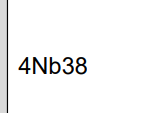 . The language is already set to English. What can I do to get the correct text?