Home › Forums › PDF24 Creator › Edit a PDF with PDF24: add text, fill in forms, change existing text
- This topic has 10 replies, 4 voices, and was last updated 5 hours, 31 minutes ago by PDF24 Support.
-
AuthorPosts
-
2010-05-18 at 22:25 #3577PDF24Guest
how should I go about editing a pdf file using PDF24?
i am trying to edit a pdf document but was unable to do so using pdf24. please help
2010-05-18 at 22:25 #3387PDF24GuestHow can I edit existing text or add text to my pdf form?
I have a form in pdf and I want to be able to edit and add existing text. How can I do this?
2011-06-01 at 10:57 #3388AnonymousGuestYou need a full PDF Editor. Our editor works page based such as removing pages or adding pages. With our online PDF editor you can draw on top of the pages e.g. to fill out forms and you can also sign a pdf document with the other online tool.
2011-10-21 at 08:19 #3544PDF24Guestcan i edit an existing pdf file
can i edit an existing pdf file (text or image)
2011-10-25 at 08:09 #3545AnonymousGuestHello yes you can but you only can edit an existing PDF file page based. You can not edit the content inside page so you can not edit texts or images or something like that.
What you can do is to remove pages, add pages from an other file, relocate pages, rotate pages and splitting a PDF file.
The above operations work on whole pages and not with the content inside pages.
2011-12-15 at 08:32 #3578AnonymousGuestUsing the PDF24 editor you can edit the PDF file page based, like erase pages, extract pages, add pages, move pages.
You can not edit the contents of a page inside the PDF file.
If you want to edit the contents of a page then edit the file by which the PDF file was created.
e.g.
use word to change the contents of a file, use PDF24 to create the PDF file and use PDF24 to compose new PDF files based on other PDF files.For your information:
The online PDF editor of PDF24 is here: https://tools.pdf24.org/en/edit-pdf2023-04-26 at 01:55 #63169phil0925ParticipantI'm able to add text to a pdf, but I don't see a button/icon for editing.
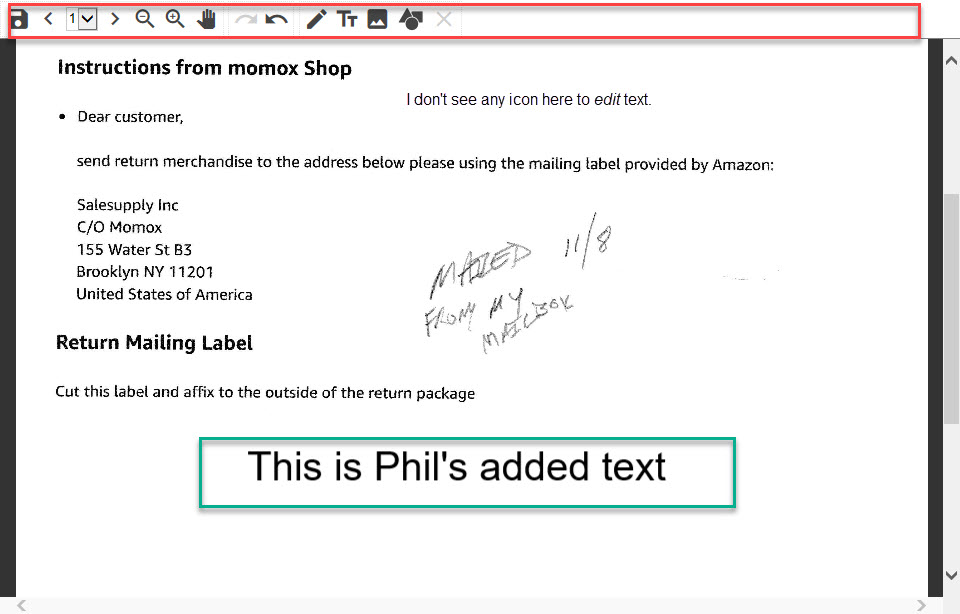
Thanks for help
Phil0925.2023-04-27 at 07:51 #63171Stefan ZieglerKeymasterPDF24 itself is not yet able to change text in a PDF. This feature is on our TODO list, but as of now we don't have a solution to offer.
2023-05-02 at 21:04 #64530phil0925ParticipantPlease see that attached image that explains reasons for choosing pdf24 over my previous product.
2024-10-24 at 18:48 #63694htaylo13ParticipantThis CAN be done using the PDF Annotator tool.
- Win10 64 bit machine with PDF24 ver 11.18.0 installed.
- Click on PDF24
- Scroll to find <Annotate PDF> -- Can be hard to locate. I've made it a "favourite" so it shows at the top.
- Left Click to open
- Drag and Drop file from your machine or click <Choose file> and wait for the file to open
- In menu bar, click <Add Text>
- A text box will open up somewhere on the page which you can adjust as desired
- Hit <return> or Click the <Add Text> icon again to close
- You can then <Save> the document with the edits.
2026-10-31 at 22:40 #65784PDF24 SupportModeratorHello,
as of today, this is what PDF24 can do (the older answers in this topic are outdated):
- Pages: merge PDFs, rotate, remove, sort or extract pages with the tools of the PDF24 Toolbox (Merge PDF, Rotate PDF pages, Remove PDF pages ...). Online, for example: https://tools.pdf24.org/en/merge-pdf
- Adding text, images or drawings: open your PDF in the PDF24 Toolbox with Edit PDF (or Annotate PDF), add a text box and save. Online: https://tools.pdf24.org/en/edit-pdf. Text that you add yourself can be changed as long as you have not saved: click it and edit it.
- Filling in a form: if your form has form fields, you can type into them directly: https://tools.pdf24.org/en/fill-out-pdf
Changing existing text or images: Editing existing content is in the works and will be released with one of the upcoming versions once it is finished. We will post here when it is available.
Until then you can replace existing content like this:
- Open the PDF in https://tools.pdf24.org/en/redact-pdf, choose White as the color and drag a box over the text or image. The content under the box is removed when saving, the area stays white.
- Open the saved PDF in https://tools.pdf24.org/en/edit-pdf and add your new text or image at the same place.
Placing only a white shape or a text box over the old text hides it, but the old text stays in the file and can still be found or copied. Step 1 removes it.
-
AuthorPosts
- You must be logged in to reply to this topic.