Hello,
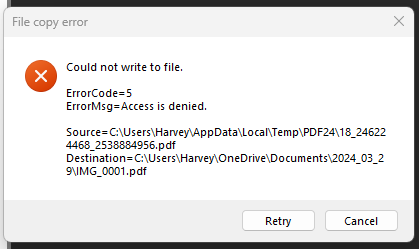
sorry for the late reply. Error code 5 ("Access is denied") comes from Windows: PDF24 creates the PDF in a temporary folder first and then copies it to the place you chose, and Windows refused to write the file there. The firewall has nothing to do with this, it only controls network access.
In your screenshot the target is in your Documents folder on OneDrive (...\OneDrive\Documents\2024_03_29\). Please try this:
- As a test, save the PDF to a folder outside OneDrive and outside Documents, for example a new folder
C:\PDF. If that works, the target folder is protected.
- One possible cause is the ransomware protection of Windows Security ("Controlled folder access"). It blocks programs that are not allowed from writing to protected folders such as Documents. If it is switched on, allow the PDF24 programs there.
- If a file with the same name already exists in the target folder, make sure it is not read-only and not open in another program.
If saving fails in every folder, please let us know which PDF24 version you use.