Home › Forums › PDF24 Creator › Error loading TWAIN driver when importing from scanner or camera
- This topic has 8 replies, 6 voices, and was last updated 5 hours, 30 minutes ago by PDF24 Support.
-
AuthorPosts
-
2016-06-15 at 11:54 #5666ritergeekParticipant
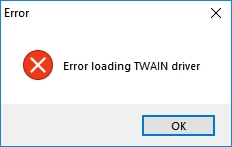
When I select Import from scanner or camera, the following error message pops up. I have two scanners installed. With other apps I can select the driver it should use. I find no option to do that in PDF24. What's the fix?
 2016-06-15 at 11:54 #861sven@mediafish.esParticipant
Hi,
I installed PDF24 Creator 7.8.1
I click: vom Scanner oder Kamera importieren (import from scanner or camera)
I immediately get the error message: Error loading TWAIN driver and it does not scan and import my file.
I then tried and installed the latest drivers for my HP F2480 Printer/Scanner without any changes - I still get this message...
Is there anything else I can do?
2016-06-15 at 16:14 #1775pdf24MemberPlease ensure that you have installed a TWAIN driver and not a WIA driver.
2016-06-16 at 08:37 #1776sven@mediafish.esParticipant....WIA driver is installed for Photoshop...
but I have been re-installing and un-installing my HP drivers for 3 times now... and still it does not install a TWAIN driver - when you search for it on twain.org it redirects you to HP but I cannot find this driver anywhere... any idea where to find this driver for Windows10 64?
2018-11-16 at 14:52 #5677Stefan ZieglerKeymasterThis error sound like that your twain driver is not working. The PDF24 Creator needs a working twain driver and then scanning should work. Otherwise, use your scanner software delivered with your scanner and scan as image. These images can then be dropped into the PDF24 Creator to create a PDF.
2018-11-17 at 01:59 #64454ritergeekParticipantI have both a flatbed and an all-in-one printer scanner installed in my computer, and both TWAINs work fine with other software. When I have a fifty-page or longer document, scanning individual images is NOT an option!
2020-11-19 at 08:50 #60390martesParticipantI have same issue - TWAIN works fine it other apps but PDF24 shows just this error.
I've also tried several TWAIN drivers - default in Windows and official from scanner manufacturer.
2020-11-19 at 09:23 #60391Stefan ZieglerKeymasterPlease use version 9.2.2 until we have fixed the known TWAIN issues with PDF24 Creator 10. TWAIN fixes will come with version 10.0.3.
2026-10-31 at 22:40 #65794PDF24 SupportModeratorHello,
as of today: the TWAIN problems of PDF24 Creator 10 were fixed with version 10.0.3, so you no longer need version 9.2.2. Please use the current version: https://tools.pdf24.org/en/creator
This is how scanning works now:
- In the PDF24 Toolbox, open Import from scanner or camera (in PDF24 Creator: File > Import > From scanner or camera...).
- The window Select source lists the TWAIN scanners installed in Windows, grouped by type (e.g. x86, x86 MS, x64). If you have several scanners, click the one you want to use. If a scanner doesn't work in one group, try the same scanner in another group.
- The window of your scanner driver opens, where you set paper size, resolution and colour and start the scan.
For long documents, tick Collect files in Select source: all scanned pages are then combined into one PDF when the scan is finished. With Close app manually, the scanner window stays open so that you can scan several batches in a row.
Only devices with a TWAIN driver are listed; a scanner with only a WIA driver doesn't appear. In that case, install the scanner driver of the manufacturer with TWAIN support if one is available, or scan with your scanner software to images and combine them into a PDF with Images to PDF in the Toolbox or online: https://tools.pdf24.org/en/images-to-pdf
-
AuthorPosts
- You must be logged in to reply to this topic.