Home › Forums › PDF24 Creator › Postscript Printer Installation
- This topic has 3 replies, 2 voices, and was last updated 1 day, 20 hours ago by PDF24 Support.
-
AuthorPosts
-
2026-10-09 at 14:29 #64425baldiluigiParticipant
Good morning,
we updated our computers to version 11.31.1, but since then the PDF24 printer no longer works.
We've seen that in some cases the issue is resolved by uninstalling everything and reinstalling it, selecting the Legacy/postscript option for printing.
Do you have any suggestions?
Thanks2026-10-29 at 18:01 #64699PDF24 SupportModeratorHello,
since version 11.31.0 PDF24 can install two kinds of PDF printer: the new driverless printer for Windows Protected Print, which is used by default on Windows 11 24H2 and later, and the classic PostScript printer. Since 11.31.1 you can choose the kind in the installer under the component PDF Printer: "Driverless (Windows Protected Print)" or "Legacy (PostScript driver)".
If the legacy printer works on your computers, it is a good solution. It works on all supported Windows versions, and later updates keep the kind of printer that is installed. You do not need to uninstall PDF24 to switch: run the installer of the current version again and select "Legacy (PostScript driver)" in the component list. The installer then replaces the PDF24 printer by the classic one. (If Windows Protected Print is switched on, Legacy cannot be selected, because Windows then does not allow third-party printer drivers.)
For several computers:
- EXE installer:
/PrinterType=ps - MSI package:
PRINTERTYPE=ps - For an existing installation, run the following as administrator in the PDF24 program folder:
pdf24-PrinterInstall.exe -printerName "PDF24" -defaultPort -upgrade -printerType ps installPrinter
Details are in the manual: https://creator.pdf24.org/manual/11/#63-classic-and-driverless-pdf-printers and https://creator.pdf24.org/manual/11/#71-command-line
A known cause with the driverless printer: if Windows does not allow it to run as a background app (Windows settings, a policy or a tuning tool), every print job fails at once with error 3003 ("problem with the printer setup") and the printer hangs afterwards. The fix for this will come with the next version.
If you would like to keep the driverless printer, please tell us which error message appears when printing and which Windows version you use.
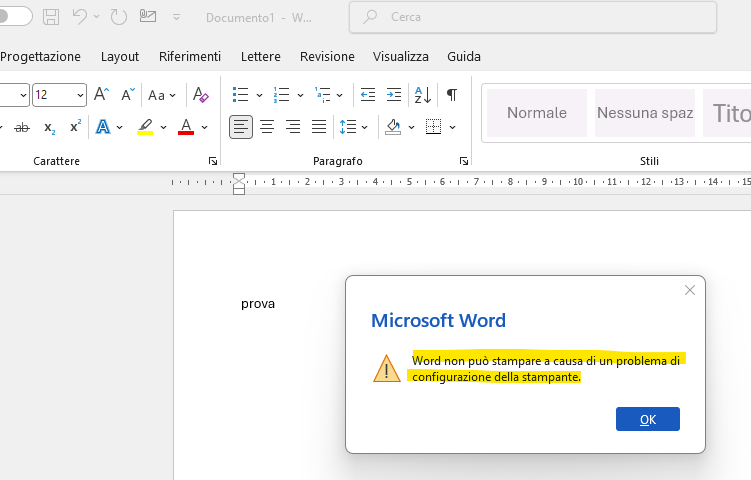
2026-10-30 at 07:33 #64803baldiluigiParticipantThis is the error that appears with the driverless printer
 2026-10-30 at 08:21 #64820PDF24 SupportModerator
Hello,
thank you for the screenshot. This message most likely has the cause we described: Windows does not allow the driverless PDF24 printer ("PDF24 Virtual Printer") to run in the background, so every print job fails at once. This happens when background apps are blocked by a Windows setting, a group policy or a tuning tool.
You can fix it like this:
- In the Windows Settings, open Apps > Installed apps > PDF24 Virtual Printer > Advanced options and make sure the background app permission is not set to "Never". If your company controls this by group policy, your IT has to allow it for the PDF24 printer packages.
- Restart the computer afterwards, so that the hanging print job is removed.
Since you have several computers in a company, the classic printer "Legacy (PostScript driver)" from our previous answer is also a good and simple choice; it is not affected by this.
The fix will come with the next version: the driverless printer will then also print when background apps are blocked.
- EXE installer:
-
AuthorPosts
- You must be logged in to reply to this topic.