Printing and saving PDF files as image

Home › Forums › PDF24 Creator › Printing and saving PDF files as image

Viewing 2 posts - 1 through 2 (of 2 total)
  • Author
    Posts
  • #63708
    eyesspy
    Participant

    I have PDF24 Creator/tools on-premise version 11.20.1, and I have an OCR system in the company that can detect certain strings for alerts. However, it's not able to detect the contents in the saved/printed PDF24 unless I use the option (Print as Image). To solve my issue I am trying to create a profile for saving and printing PDF as Images only but I am not able to find that option in the settings.

    Could you please help me to lock down this to save and print edited PDFs as Images in the output PDF files.

    #65379
    PDF24 Support
    Moderator

    Hello,

    there is no setting or profile yet that makes PDF24 always print or save as image, and it cannot be locked down by an administrator. Thank you for the suggestion, we will add it to our list.

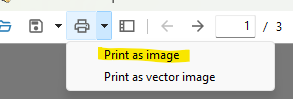
    You use version 11.20.1. Since version 11.31.0 you can do it per document in the print dialog of PDF24 Reader, please update:

    1. Open the PDF in PDF24 Reader and click "Print".
    2. Under "Options", tick "Print as image". You can also choose the resolution (150, 300 or 600 DPI).
    3. To print, choose your printer. To save, choose "Create new PDF" as printer. The new PDF then contains the pages as images.

    Printing from PDF24 Creator and the Assistant also uses this print dialog since 11.31.0.

    For automated printing, PDF24 Reader can print from the command line with the flag forceImagePrint: https://creator.pdf24.org/manual/11/#121-command-line
Viewing 2 posts - 1 through 2 (of 2 total)
  • You must be logged in to reply to this topic.