Forum Replies Created
-
AuthorPosts
-
Stefan ZieglerKeymaster
I think the Acrobat Reader had a bug. Ever tried with the current Acrobat reader?
Stefan ZieglerKeymasterYou can remove a PDF password very easily with PDF24. You can do that online and offline. Our online password removal tool is located here: https://tools.pdf24.org
To remove a PDF password with the PDF24 Creator do the following:
1. Open the protected PDF file with a PDF reader
2. Print this file on the PDF24 PDF printer.This produces a password free PDF files which you can use further.
Stefan ZieglerKeymasterMaybe maybe not. I've added a point to our TODO list so that we can think about this.
2018-10-09 at 06:02 in reply to: Custom page size from printer properties ignored, PDF stays A4 #5633Stefan ZieglerKeymastercurrently this can not be shortened. This is the standard Windows way do that, but all this could be customized to improve the user experience here. This feature request is now on our internal TODO list.
Stefan ZieglerKeymasterThe Save As dialog gives you some options to select the color space. There you can also choose grey to render the PDF in greyscale.
Stefan ZieglerKeymasterI hope so, because we try to keep the features in sync so that we can target offline and online users. Offline solution development is a bit harder and here we need more time to bring new features.
Stefan ZieglerKeymasterWe have a special tool for that, a tool, to digitally sigh PDF files and this tools supports signatures as PNG, JPG and you can also add a signature via camera or you can add one via a pen.
This tool is located here:
https://tools.pdf24.org/en/sign-pdfStefan ZieglerKeymasterRandomly or is there a pattern?
Older versions can be downloaded that way:
https://stx.pdf24.org/products/pdf-creator/download/pdf24-creator-8.6.1.exeThe version number at the end can be changed to download a specific version.
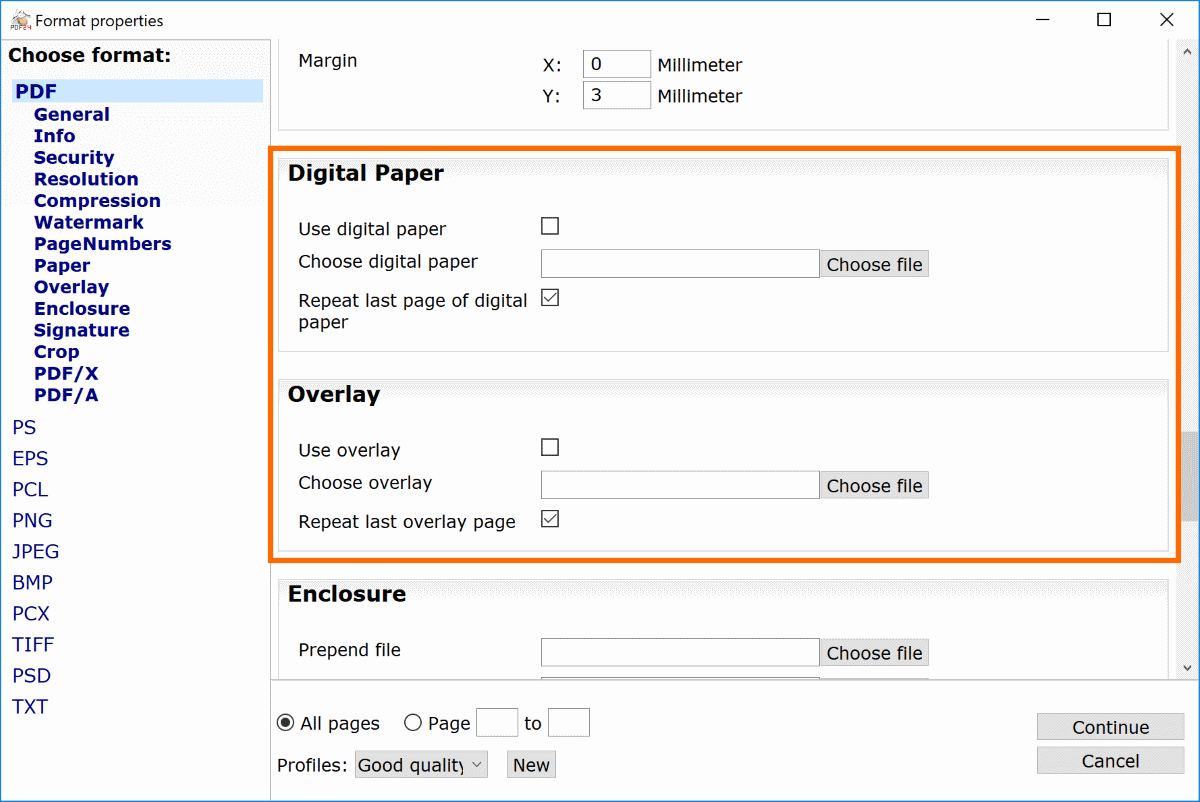
Stefan ZieglerKeymasterHello, open the Creator and load your PDF file. Then click Save As and under the PDF file type you have the overlay and paper option.
 Stefan ZieglerKeymaster
PDF24 produces searchable PDF files. That is the normal case. In some rare situations your PDF file is not searchable.
- This can happen if no unicode information of a font is available.
- You PDF contains only images and these are not searchable by default. An OCR step is required here to make these PDF files searchable.
2018-09-06 at 05:54 in reply to: Load a custom profile or set Low quality as default without admin rights #5580Stefan ZieglerKeymasterYou should clarify why this does not work on work. It should work and you do not need admin privileges for this feature. The last used profile is stored in the user profile in the registry under the path HKEY_CURRENT_USER(/Software/PDFPrint.
If this feature is not working for you, then you should find out why the setting is not stored under this path.
Stefan ZieglerKeymasterCurrently you can't do this with PDF24. We have such a feature request on our list, but we currently have no stable solution for that. As soon as we have one, we will add it to our software.
Stefan ZieglerKeymasterThe printer profiles are store in the registry under the following path:
HKEY_LOCAL_MACHINE\SOFTWARE\WOW6432Node\PDFPrint\ServicesPrinters could also be created on a server and then shared with the users, but that often also means that there is no user context and you can not store in a user specific folder.
2018-08-30 at 13:21 in reply to: Create several printers with overlays and print to physical printer #5566Stefan ZieglerKeymasterah, file must be lowercase. You have to use "${file}" or "$file"
2018-08-30 at 11:03 in reply to: Create several printers with overlays and print to physical printer #5564Stefan ZieglerKeymasterPlease try to execute the command manually on the command line in a shell. Does this work?
2018-08-30 at 10:38 in reply to: Create several printers with overlays and print to physical printer #5562Stefan ZieglerKeymasterHmm weird. Do you see any kind of error or are the printout in the Windows printer queue and can not be processed or send to the printer?
2018-08-30 at 10:21 in reply to: Create several printers with overlays and print to physical printer #5560Stefan ZieglerKeymasterSeems that you have used a dash at -printerName and not a hyphen. I've corrected your command in your question. Please test this one.
2018-08-30 at 10:07 in reply to: Create several printers with overlays and print to physical printer #5558Stefan ZieglerKeymasterDo you have an application installed, that can print PDF files? The shellPrint command uses ShellExecute from Windows with the print operation. In order to get this to work, there needs to be an application installed that can print the file and that registers correctly in Windows. If you have e.g. the Adobe Reader installed, than the shellPrint command should work.
Stefan ZieglerKeymasterDo you use the shellPrint command from the pdf24-doctool? This shellprint command simply uses ShellExecute from windows with the printo or print operation. If the printto operation is not registered in windows, then we use therint operation as fall back and there is can be that the print out fails. In this case we do not exactly know whether the the file is printed correctly on the pdf printer or not and therefore we show this little message box. I can have a look at the code to search for options to prevent this message if this would help you.
Stefan ZieglerKeymasterYou can also use the PDF24 Creator to save with password. Hit the Save As button and open the PDF security page and there you can set the PDF password. Both tools, the online version and the PDF24 Creator use AES 256 Bit for security.
Stefan ZieglerKeymasterOur online tools has the better editor. The online tool to edit PDF files is located here:
https://tools.pdf24.org/en/edit-pdf
The PDF24 Creator can only work page-based and that means deleting, adding, moving, ... whole pages but you can not editor contents in a page. The online editor is a bit more powerful here.Stefan ZieglerKeymasterYou can do the following trick: Hod down down CTRL Key when clicking on a tile in the launcher. This keeps the launcher open.
Stefan ZieglerKeymasterTry to use the PDF24 DocTool. Start this executable without arguments and you will see the command line parameters. There is the possible to convert files to PDF.
Stefan ZieglerKeymasterAutomatically not, but manually. Richt click your file, select PDF24 in context menu and choose the split tool there. Process to split your file, one page per file.
Stefan ZieglerKeymasterWhat version do you use? Please ensure, that you change the settings for all users. There is a select box at the bottom of the settings and the Update option should be saved for all users.
Stefan ZieglerKeymasterPut a logo.jpg files into the install directory of the PDF24 Creator. This replaces the banner in the application. Otherwise you can use the customizer on our website to create a custom setup, where you can replace the banner as well.
Stefan ZieglerKeymasterOpen your files with an application, that can print the file as vector. Then print your file with that application on the PDF24 PDF printer. This should produce a vector PDF.
Stefan ZieglerKeymasterThe text mode of PDF compare strips the text from the two PDF files and compares just the text. We also work on a visual compare mode where the formatting is kept, but this version is currently not production ready.
Stefan ZieglerKeymasterPlease try another quality level or reduce the DPI, This creates smaller files. I don't know what Adobe is using for the DPI value, but lover DPI creates smaller files and smaller files can be processed quickly. When you print on the PDF printer, open the settings and reduce the DPI there.
Stefan ZieglerKeymasterLanguages can be set for all users and for a specific one. Configs are located in the Winodws registry under HKEY_CURRENT_USER\Software\PDFPrint and HKEY_LOCAL_MACHINE\SOFTWARE\WOW6432Node\PDFPrint. The settings UI can modify both. There is a selection box at the bottom where you can switch between "All users" and "Current user". To force a language for all users, add the following value to the registry:
HKEY_LOCAL_MACHINE\SOFTWARE\WOW6432Node\PDFPrint
!Language=English
The ! at the beginning makes this setting important and then this setting can not be overridden by users. -
AuthorPosts