Forum Replies Created
-
AuthorPosts
-
Stefan ZieglerKeymaster
You can provide profiles for all users in the HKLM registry path. Simply copy a profile from
HKEY_CURRENT_USER\Software\PDFPrint\Profiles\fo
to
HKEY_LOCAL_MACHINE\SOFTWARE\WOW6432Node\PDFPrint\Profiles\fo
to make it available for all users.
Stefan ZieglerKeymasterNormally PDF24 reverts the change automatically after the file is printed. This is the normal case. If the default printer can not be changed back, then something must prevent this. Hmm, maybe the application that prints the file. Hmm
Stefan ZieglerKeymasterDrag and Drop conversion automates the following steps:
1. open the file in the default reader
2. print on the pdf printer
3. load the pdf in the UISometimes it can happen, that pdf24 is unable to change your default printer to the PDF24 printer in order to convert the files. If this happens, the file is printed on your default printer.
Solution:
Change your default printer and use your PDF24 PDF printer as default. This normally helps here.Stefan ZieglerKeymasterPDF standard = PDF/A1
Color model = CMYK
Color conversion = CMYKNd Select your ISOcoated_A2 file in the PDF/A settings.
Stefan ZieglerKeymasterYes you can prevent that. Just use
REGISTERREADER=Noas state in the initial post.Stefan ZieglerKeymasterThe PDF24 installer does not change the default printer in Windows. We just install a new printer in your system, we we do not set it to default. The reason must be another.
Stefan ZieglerKeymasterDas kann ich mir kaum vorstellen, dass alles in ein Bild gewandelt wird. Senden SIe mir doch bitte einmal Testdateien an forum@pdf24.org, damit ich diese untersuchen kann.
Stefan ZieglerKeymasterPlease use the unlock pdf tool to remove the PDF encryption and after that, use this newly created unlocked PDF to do what you want. The tools located here: https://tools.pdf24.org/en/unprotect-pdf
Stefan ZieglerKeymasterRegistration of the PDF24 Reader can be prevented with the command line flag /NOREADERREG for the EXE installer and REGISTERREADER=No for the MSI setup.
Stefan ZieglerKeymasterOK, can you send me test files and a short list of steps to forum@pdf24.org so that we can reproduce your issue? Then we can investigate further and hopefully fix this issue.
Stefan ZieglerKeymasterThe auto rotate option should help here. This option rotates pages automatically. Do you disable this option? Ensure that this option is enabled in the Save As dialog.
Stefan ZieglerKeymasterWe do not have a tool for such purpose.
Maybe this tool helps: https://tools.pdf24.org/en/extract-images
There you can extract images embedded in PDF files and then you can open the images in an editor to see image information. Windows explorer also gives you size information in the properties dialog.
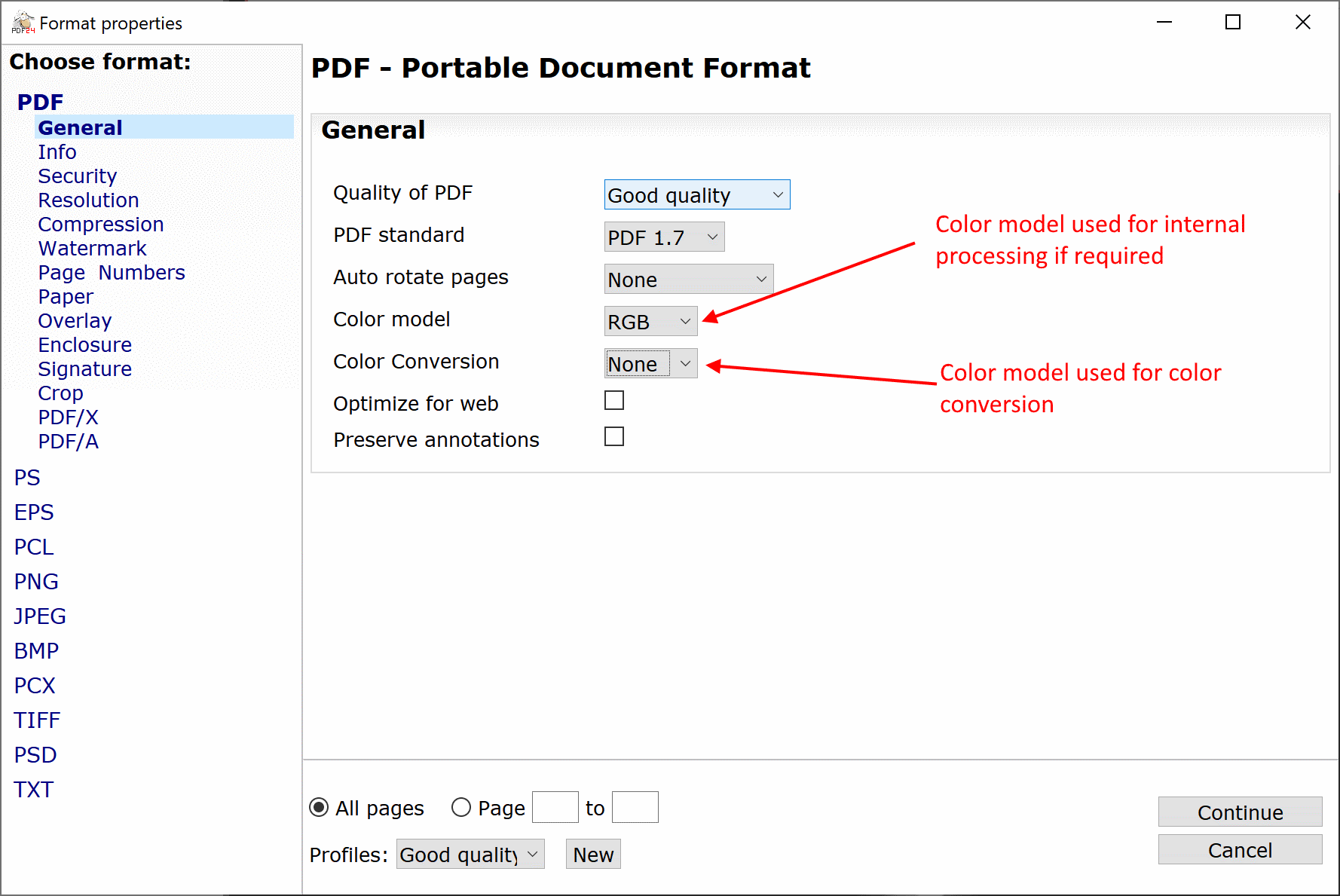
Stefan ZieglerKeymasterHere is a screenshot that describes both settings. Could be that the Dutch translation is not that good here. If we can optimize translation texts, tell me.
 Stefan ZieglerKeymaster
Do you use multiple screens? Could be that the window is simply not visible due to misplacement. If you use multiple screens, try with one.
Otherwise try to delete settings under the registry path HKEY_CURRENT_USER\Software\PDFPrint. Delete settings which starts with Creator.
Stefan ZieglerKeymasterYou could try to print defected PDF files on the PDF printer to create a new PDF files. This often fixes problems.
Stefan ZieglerKeymasterIn PDF24 Creator 8.7.0 a full PDF Reader has been integrated, which you can use to view PDF's. The PDF24 Reader is lightweight, requires little RAM and loads very quickly, but still offers all the features you would normally expect from a PDF Reader.
Please try it out. Simply install the latest PDF24 Creator.
Stefan ZieglerKeymasterProduced PDF files should be searchable if the files contain text and not just images. if the file contains images, then you have to use OCR. If text is there, but not selectable, then security options could prevent that too. In rarely cases, there is something wrong with your PDF.
Stefan ZieglerKeymasterThe shellprint command just uses the ShellExecute Function from the Windows API with the "print" operation. What follows than is not up to PDF24.
Stefan ZieglerKeymasterIs the printer configured to save automatically? How is you configuration actually? What do you try to do?
Stefan ZieglerKeymasterHow large is the file? You could also test with two or three files to see what happens. You could also try to reproduce the PDF's by printing them on the PDF printer. This often fixes small errors in PDF files.
Stefan ZieglerKeymasterThere is normally not a restriction.
What documents do you merge? All PDF's? Merging PDF's should normally run quickly, at least for most PDF's.
Merging is done via Ghostscript. You can open a console via F12 and there you can see a little more information about the process.
If you do not merge PDFs, then it can take longer, because each file must be converted to PDF first.
Stefan ZieglerKeymasterNo, not with PDF24. A PDF can contain media data, but we do not recommend adding videos to PDF files.
2018-11-21 at 14:02 in reply to: autosave batch documents printed to PDF24 with different filenames #5687Stefan ZieglerKeymasterI think there is a simpler solution for your problem. Just use the PDF24-docTool.exe to convert your files to PDF. Use the following command line:
pdf24-DocTool.exe -convertToPDF [-profile profileId] -outputFile OUT FILE1 [FILE2]
This lets you specify the input file and the output file.
When you call the docTool without arguments on the command line, then the tool outputs all command line arguments.
2018-11-19 at 10:24 in reply to: MSI option REGISTERREADER does not prevent the default PDF reader prompt #5683Stefan ZieglerKeymasterWe currently try to figure that out because we do not know why that happens.
The REGISTERREADER command line argument prevents settings the default value for the PDF file class in the registry under Software/Classes/.pdf so that the current registered reader is not changed in the system.
The PDF24 reader is added to the OpenWithProgids of the PDF file type to make the PDF24 reader an option for PDF files when the user right-clicks PDF files and chooses open with. Windows then shows a list of apps that support reading pdf files.
This could be the cause that Windows re-asks for the default application, but this is currently only my assumption and we have to investigate further here to to figure that out. Here you would have an option that you could test if you can, which means you could remove settings these registry values from the MSI if you can't wait until we have a solution for that problem.
2018-11-16 at 14:52 in reply to: Error loading TWAIN driver when importing from scanner or camera #5677Stefan ZieglerKeymasterThis error sound like that your twain driver is not working. The PDF24 Creator needs a working twain driver and then scanning should work. Otherwise, use your scanner software delivered with your scanner and scan as image. These images can then be dropped into the PDF24 Creator to create a PDF.
Stefan ZieglerKeymasterYou should use the PDF24 Creator if you can. This is a software for Windows and this one can create PDF/A files. Our online OCR tool is sometimes a bit busy in peak cases. We increase our workers periodically, but sometimes it comes to peaks and a lot of people use our services and then it can take time to get a result. My advise is, use the PDF24 Creator if you can.
Stefan ZieglerKeymasterDo you have installed a twain compatible driver on your system? If that is the case, then your scanner should appear in the list.
Stefan ZieglerKeymasterWe already have tasks on our list to improve the signing process. I've also added this question to the list so that your points flow in. At the moment I can't say when all these tasks will be implemented. It's too soon for that. We have a lot of points on our list and we try to make the PDF24 Creator really really cool and signing is one of the features we like.
Stefan ZieglerKeymasterYou say it hangs. What exactly does that mean? What do you see? OCR is a time consuming task and it sometimes takes a bit longer to get your job processed. Leave the status window open and wait until processing finishes. Sometimes our OCR backend is a bit busy. All jobs are queued and we process them in order and this could take a couple of minutes. We know that there are some peaks and we will increase our worker machines in the near future.
Stefan ZieglerKeymasterCurrently not. The PDF24 has a feature to generate an ID which you can append to the filename with the id placeholder, but I think is not what you want? Why do you need incremental numbers?
-
AuthorPosts