Forum Replies Created
-
AuthorPosts
-
Stefan ZieglerKeymaster
What exactly do you mean here? Please describe a bit more detailed.
Stefan ZieglerKeymasterHi, currently there is no option. I think we can add an option to the settings for that. This is on our TODO and planned for the next version.
Stefan ZieglerKeymasterWe have to find out why, in order to fix this issue. Please export the the settings via regedit, export the path HKEY_CURRENT_USER\Software\PDF24.
Send the export to forum@pdf24.org.
You can als help here, settings for the assistant have the prefix assistant. Rename all, e.g. by adding an underscore in front of assistant. Then start the assistant again. If it works then, then we know, that this is an issue with a setting. Then remove the underscore from one item and start the assistant again. If it crashes, then we know the specific key which causes the crash. If you've found the key, that causes the crash, post the key and the value here.
Stefan ZieglerKeymasterIt normally does. If not, it could be an XFA form or an other issue. Please send the file to forum@pdf24.org so that we can investigate further.
Stefan ZieglerKeymasterThis is currently not supported. I've added this to our TODO list.
Stefan ZieglerKeymasterDownload a specific installation package (EXE or MSI) from our download site and execute it. Then you can choose the folder where to save the file.
Stefan ZieglerKeymasterPlease send me a download link to forum@pdf24.org (e.g. share via google drive) so that I can test this with that file. If I get the same problem, then I can fix the issue.
Stefan ZieglerKeymasterAll settings are stored in the registry.
https://creator.pdf24.org/manual/11/#4-registry-settings
You could export your current setting via regedit and then you can easily import them via the exported file.
2025-08-13 at 14:50 in reply to: Split PDF: cut a single page at a custom position (e.g. 60/40) #64006Stefan ZieglerKeymasterJust enter custom mode
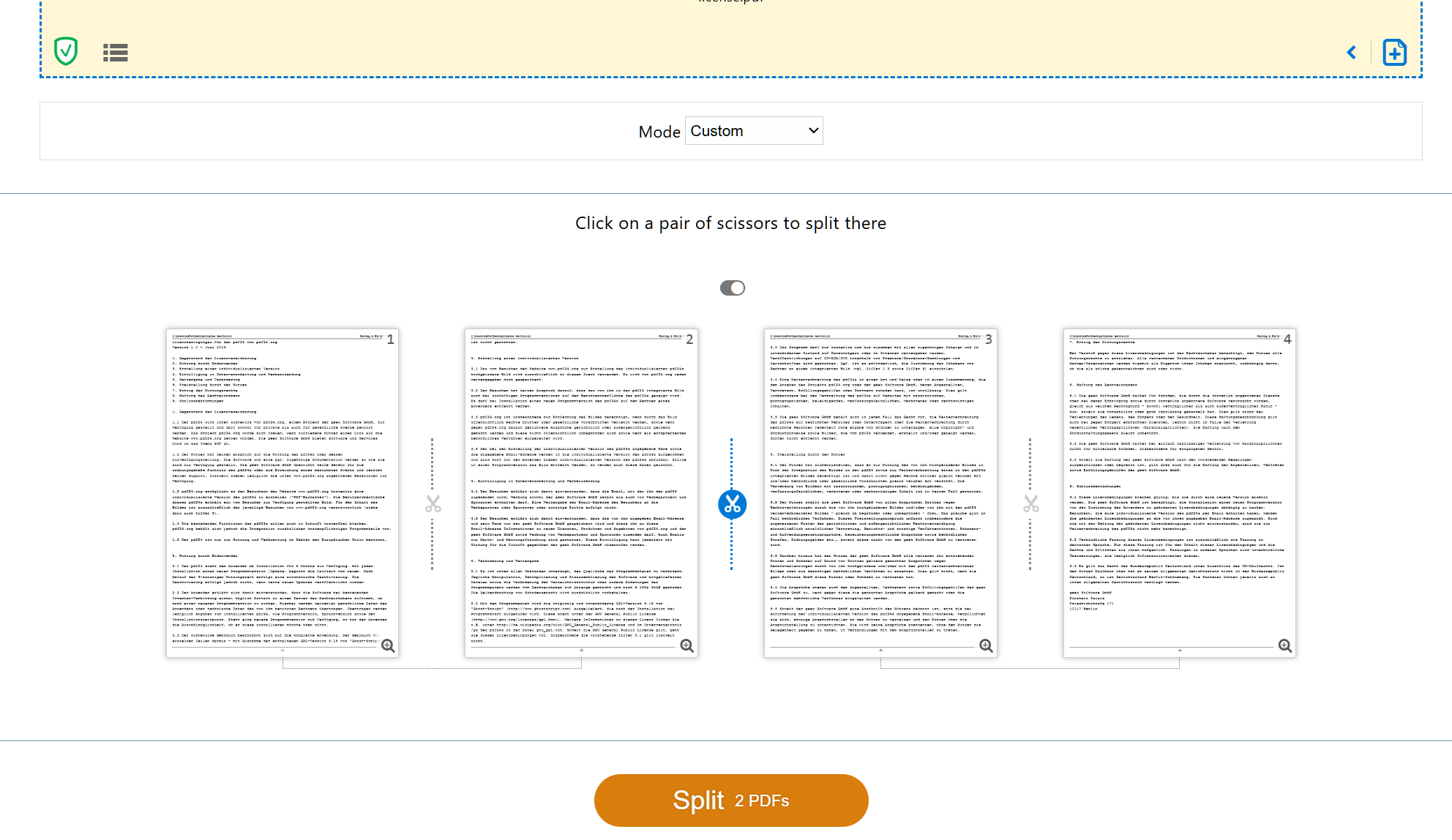 Stefan ZieglerKeymaster
Use the toolbar to change the color of an area. First you have to add a new object (e.g. a rectangle), select that object and then the color tools will appear in the toolbar.
Stefan ZieglerKeymasterI think you just need this tool:
Stefan ZieglerKeymasterYou could use the redact tool for that:
Stefan ZieglerKeymasterThe problem should now be fixed with the online tool. The fix for the offline tool comes with the next version of the software..
Stefan ZieglerKeymasterPlease send the problematic PDF file and a description or screenshots to forum@pdf24.org so that I can check that.
Stefan ZieglerKeymasterWhich merge tool do you mean? In which specific PDF24 app?
2025-07-07 at 07:50 in reply to: PDF24 Creator: keyboard shortcut to move a document up or down #63978Stefan ZieglerKeymasterCurrently there is such shortcut. What would you recommend?
2025-07-02 at 11:46 in reply to: PDF editor: stamps and symbols like check mark, cross or "Sign here #63974Stefan ZieglerKeymasterOf course, we have a lot of TODO items and we regularly bring improvements to the software.
Stefan ZieglerKeymasterIf PDF24 Reader is your default app for PDF files, then it should work.
Stefan ZieglerKeymasterHi, I think we do not have an option for that right now. I'll add this to our TODO list.
Stefan ZieglerKeymasterActually it should have been fixed. It works on my computer now. Maybe there is another problem on your computer. Can you print these files? It there a print context menu option for these files? If so, then an app is registered for these files and then converting to PDF should work. If there is no print option of of the print option does not work, then conversion fails. Did you switch to Outlook New?
Stefan ZieglerKeymasterTo hide the tools you have to use the IDs "editPdfBookmarksTool" and "repairPdfTool". This can be configured in the settings area or directly in the Windows Registry:
HKEY_CURRENT_USER\Software\PDF24
HKEY_LOCAL_MACHINE\SOFTWARE\PDF24toolbox.hideElements = editPdfBookmarksTool, repairPdfTool
Stefan ZieglerKeymasterPlease send some screenshots to forum@pdf24.org so I can see what you see.
Stefan ZieglerKeymasterPlease send an email to team@pdf24.org
2025-06-10 at 13:50 in reply to: Edited or merged PDF does not appear in the target folder after saving #63954Stefan ZieglerKeymasterHi, please update to version 11.26.1
Stefan ZieglerKeymasterPlease send me your trainDataList.txt file to forum@pdf24.org, which must located in the %LOCALAPPDATA%PDF24tesseract5.4.1 directory.
Stefan ZieglerKeymasterMaybe blocked by a firewall?
Stefan ZieglerKeymasterThat's fine. Try to delete the %LOCALAPPDATA%PDF24tesseract folder and then try OCR again.
Stefan ZieglerKeymasterDo you use the latest version of pdf24 creator? Which version do you use?
Stefan ZieglerKeymasterPlease send me your trainDataList.txt file to forum@pdf24.org, which is located in the %LOCALAPPDATA%\PDF24\tesseract\5.4.1 directory.
Stefan ZieglerKeymasterThe file name of srp_latin.traineddata should be srp_latn.traineddata, wothout the i.
-
AuthorPosts