Forum Replies Created
-
AuthorPosts
-
Stefan ZieglerKeymaster
The fileName is derived from the print job name but there is no variable for the folderName. Most of the time a folder name does not exists because not available in the print job name.
Stefan ZieglerKeymasterPlease send me test file to forum@pdf24.org so that I can have a look. Please also send a short list of instructions which I can follow to reproduce the problem. You can also add screenshots.
Stefan ZieglerKeymasterWe have such topics on our TODO list, but currently we can not provide a solution here.
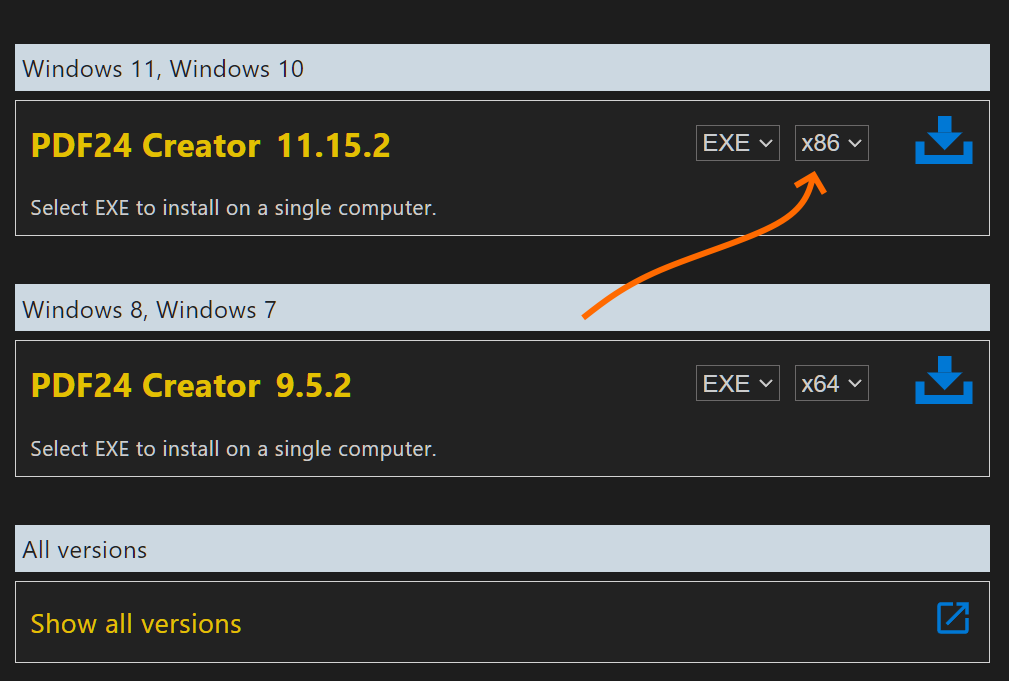
Stefan ZieglerKeymasterHi, please go to https://tools.pdf24.org/creator and download the software for the x86 processor type. In the download section you can choose the installer type and the processor type.
 Stefan ZieglerKeymaster
Please send me such a PDF file to forum@pdf24.org so that I can have a look what's happening here.
Stefan ZieglerKeymasterThere is a pdf24.exe service process that waits for new print jobs and a user process that receives the print job from the service, so that tueh user can do something with the new file.
Stefan ZieglerKeymasterHere is the information you need:
https://creator.pdf24.org/manual/11/#410-registry-settings-related-to-pdf24-readerSearch for "OpenInExistingInstance"
Stefan ZieglerKeymasterThis is because you have configured an output directory and you have checked the "Save in same folder" option. If the directory of the source file is the same as the output directory, the the app saves two files. The first save operation saves in the output directory and the second saves the result in the same folder of the source file. So, just use an output folder or "Save in same folder", but not both.
Stefan ZieglerKeymasterThere is a setting option with the name "blackenSecurity.dpi". Here you can set the DPI value that is used for blackening. The default value is 150. This value can be created as a DWORD in the registry path HKLM\SOFTWARE\PDF24 or HKCU\SOFTWARE\PDF24.
The option is described in the manual:
https://creator.pdf24.org/manual/11/#48-registry-settings-related-to-pdf24-toolboxIf you increase the DPI value, the quality of the page should improve, but this will also increase the file size. A lower value results in lower quality and a smaller file size.
Stefan ZieglerKeymasterDo you use the latest version? If not, please update.
Stefan ZieglerKeymasterCan you send me screenshots or a screencast to forum@pdf24.org so that I can see the problem?
Stefan ZieglerKeymasterThe -profileParam switch is available since version 11.7.0
Stefan ZieglerKeymasterHi, currently there is no option, but I have seen that the framework we use for PDF24 Reader now supports this and I think we could now see if everything is in place so we can work on this.
Stefan ZieglerKeymasterPlease send such a tiff file which is not working to forum@pdf24.org. Then I can see what happens. If the file is large, it's better to share the file via Google Drive or a different file sharing service.
Stefan ZieglerKeymasterIf there is a file in the clipboard, then the menu item should be usable. Can be tested like this. Copy a file in Windows Explorer. This brings the file to the clipboard. Then go to PDF24 Creator and add the file via the "From clipboard" menu item.
Stefan ZieglerKeymasterHi, PDF24 currently does not have such a feature, but we already have it on our TODO list. The file preview is already implemented which you can enable/show in Windows Explorer. But the implementation of the ICON preview is not ready yet.
Stefan ZieglerKeymasterHi, currently not possible with PDF24,but we have such a point on our TODO.
Stefan ZieglerKeymasterThe -applyProfile switch of pdf24-DocTool.exe is the right way. There is another switch which you can use the override settings of that profile. This is -profileParam key value.
pdf24-DocTool.exe -applyProfile -profile user/XXXXXX -profileParam pdf-watermarkText YYYYYYYY .....
Stefan ZieglerKeymasterHi, currently there is now way to pre-scale an added signature. What you can try currently is the following: When you import, you could use a smaller image which then results in a smaller signature. I've added this to our TODO and we will see what we can do here.
Stefan ZieglerKeymasterThe PDF24 DocTool is unable to convert PDF files to HTML. Currently you can do this only manually via the toolbox.
Stefan ZieglerKeymasterHi, just hit F11. F11 shows the file in full-screen.
Stefan ZieglerKeymasterCurrently not possible, but we have such a point on our TODO.
2023-10-19 at 15:36 in reply to: OCR with two languages (English and Sanskrit), also on the command line #63360Stefan ZieglerKeymasterIf you have a current version, then you can choose more than one langage.
Stefan ZieglerKeymasterPDF24 Creator can do that. Just use the merge tool in the toolbox or open the Creator and merge your files there by using the "Zipper merge icon" in the toolbar.
Stefan ZieglerKeymasterHi, PDF24 OCR command line is described here: https://creator.pdf24.org/manual/11/#101-command-line
Stefan ZieglerKeymasterOpen Settings->PDF Printer. Add a PDF printer and configure it to save files automatically.
2023-10-02 at 06:07 in reply to: Windows Quick Access not shown in PDF24 Creator file browser #63345Stefan ZieglerKeymasterYes, this has not been added to the file explorer. I'll add this issue to out TODO, so that we will see if we can add this.
Stefan ZieglerKeymasterI think it's so hard-wired and there's currently no option to change it. But I'll check again. I'm also adding this point to the TODO list because such an option makes sense.
Stefan ZieglerKeymasterOpen Settings->PDF printer and configure your printer to save files automatically. It is a good decision to create a separate PDF printer for this. Via settings, you can install as many PDF printers as you like.
Stefan ZieglerKeymasterHi, where do you see mm units?
-
AuthorPosts