Forum Replies Created
-
AuthorPosts
-
Stefan ZieglerKeymaster
- From original bookmarks of merged PDFs is supported when files are joined.
- From names of merged PDFs is supported via pdf24 toolbox
- From word summary table when transforming word to PDF is still not supported but you can open the Word file and export as PDF. This also exports the bookmarks
- Alternatively, you can also use the following tool to edit PDF bookmarks and add new bookmarks: https://tools.pdf24.org/en/edit-pdf-bookmarks
Stefan ZieglerKeymasterPlease try the latest version 11.4.0. Does this version solves your problems?
Stefan ZieglerKeymasterPlease use the latest version of the PDF24 Creator because the problem should be solved there.
Stefan ZieglerKeymasterWe know this issue and we still work on improvements...
Stefan ZieglerKeymasterI think this is a problem with the internet connection. Status code 0 is not a valid server response, but the Browser uses 0 if the browser could not connect to the server.
Stefan ZieglerKeymasterThe -splitByPage flag can currently only split after each page.
Stefan ZieglerKeymasterCurrently you can install PDF24 on Android like this:
- Open https://tools.pdf24.org in Chrome
- Click the menu icon in Chrome and click Install to Home Screen.
Stefan ZieglerKeymasterPlease read here: https://creator.pdf24.org/manual/11/#3-msi-installer
2022-08-31 at 16:10 in reply to: DocTool: Excel to PDF larger with profile default/low since 11.8.0 #62793Stefan ZieglerKeymasterYou have to use an uppercase P... -noProgress
Stefan ZieglerKeymasterYes, we know, we work on Chinese support.
Stefan ZieglerKeymasterHi, we know, we work on that.
2022-08-31 at 15:59 in reply to: PDF24 printer keeps becoming the default printer on terminal server #62787Stefan ZieglerKeymasterPDF24 itself does not do this. There is no code that does this. I think that this is a side effect of something else.
2022-08-31 at 15:57 in reply to: Cyrillic text in added text field displayed incorrectly after saving #62786Stefan ZieglerKeymasterYes, this is a known issue and this issue is still on our TODO. Font support for Cyrillic and others are still not available.
Stefan ZieglerKeymasterPrinter Install Description has been added to the PDF24 Creator Manual:
2022-08-31 at 15:51 in reply to: Merge PDFs via DocTool command line without profile (just assemble) #62783Stefan ZieglerKeymasterI thin you have to add -profile none
Stefan ZieglerKeymasterCheck the PDF24 windows Service, the state must be running, otherwise the PDF printer will not work. The user is SYSTEM, which is unusual. I think that this is th problem because PDF24 does not know the actual user.
2022-08-08 at 20:34 in reply to: Merge PDFs via DocTool command line without profile (just assemble) #62759Stefan ZieglerKeymasterThis is specified in the manual:
Stefan ZieglerKeymasterPDF24 does a ShellExecute internally and invokes the registered app for that file type to print the specified file. This app then prints the file on the PDF printer. If font size is different, then ensure that the same application is registered in windows and that this app has same settings.
Stefan ZieglerKeymasterHi, please send me the pdf files so that I can investigate here. Please send to forum@pdf24.org
Stefan ZieglerKeymasterHi, -outputdir and -outputfile can not be used together. If you use -outputfile, then specifiy the full file name here which means the following:
pdf24-doctool -convertToPdf -profile user/OnPremiseReport -outputFile c:\secctrl\ajh.pdf c:\secctrl\on_premise_2022-07-18_1353.txt
Stefan ZieglerKeymasterHi, are both passwords always different or just the password to open the PDF file?
Stefan ZieglerKeymasterLatest version that supports Windows 7 is version 9.2.2
Stefan ZieglerKeymasterHe latest PDF24 Creator Version 11.3.0 brought this feature. Open the toolbox, choose the merge pdf tool, select pdf files and then you will see the new bookmarks checkbox option.
Alternatively, you can also use the following tool to edit or add new bookmarks:
https://tools.pdf24.org/en/edit-pdf-bookmarksStefan ZieglerKeymasterHmm yes, we are working on it. Our online watermarking tool now supports Russian text, and we will integrate this support into our offline tool as well. Can you confirm that the online tool works for you?
Stefan ZieglerKeymasterThe latest PDF24 Creator version should be able to keep bookmarks from documents. The code base is now the same when you use the merge pdf tool from the toolbox of the pdf24 creator.
Stefan ZieglerKeymasterCurrently there is no option for this, but the next version 10.7.1 will bring such a feature so that you can configure whether a file should be opened in a new instance or in an existing one.
2021-11-01 at 08:36 in reply to: pdf24-DocTool command line: suppress the profile selection dialog #60619Stefan ZieglerKeymasterPlease ensure that the user profile with the name "totxt" exists. If not, the profile selector dialog will pop up.
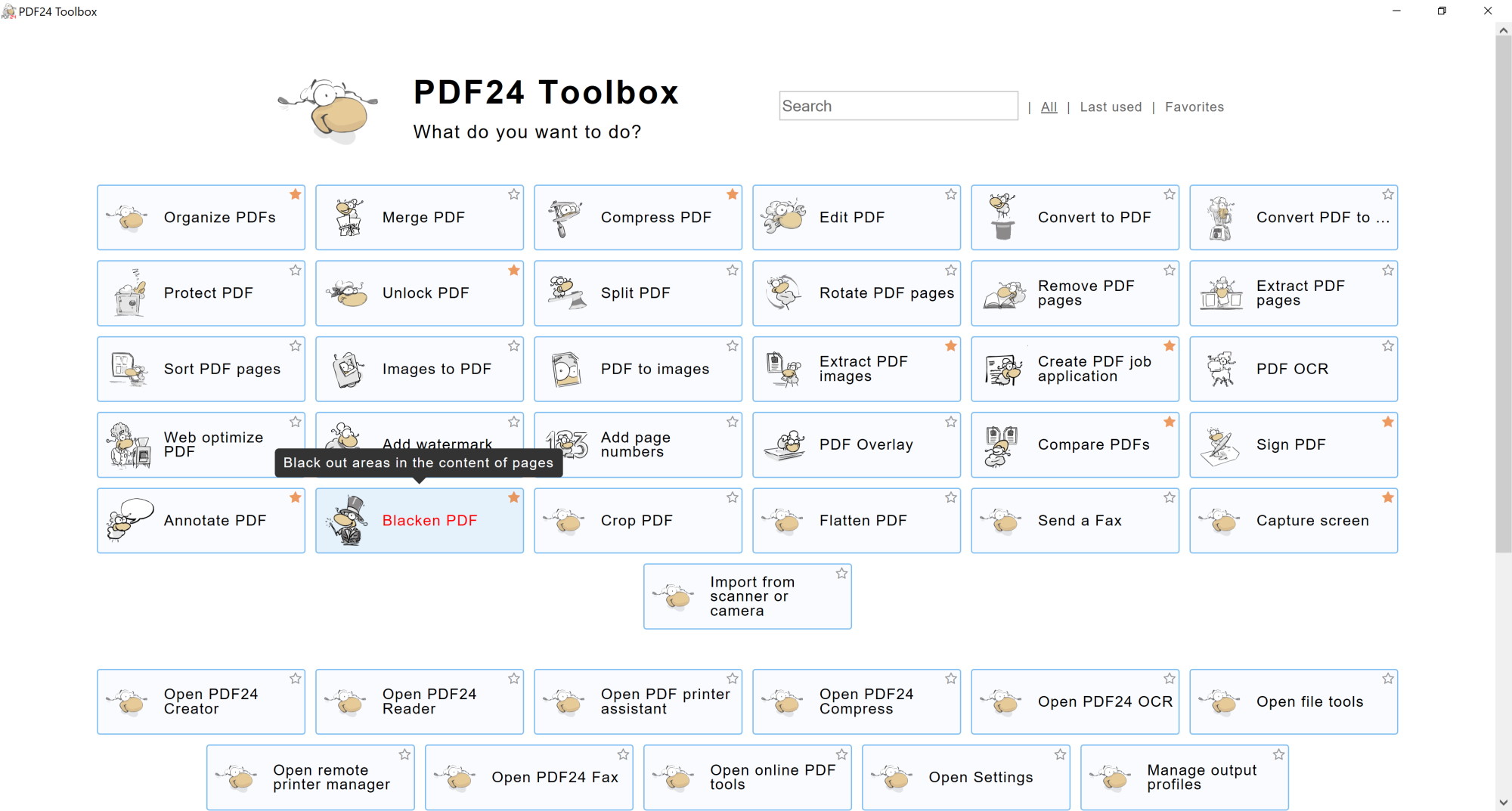
Stefan ZieglerKeymasterYes, but you have to use the current version 10.X.X. This blacken/redact tool is available in the toolbox. So, install the latest version and double click the PDF24 desktop icon to open the toolbox. Then you will see the black sheep.
Stefan ZieglerKeymasterHi, I think you mean our blacken pdf feature? A few days ago I received an email telling me to rename the tool "blacken pdf" to "pdf redact" as this term is more common. Personally, I am unsure about this. Is our current "blacken pdf" tool what you are looking for?
 Stefan ZieglerKeymaster
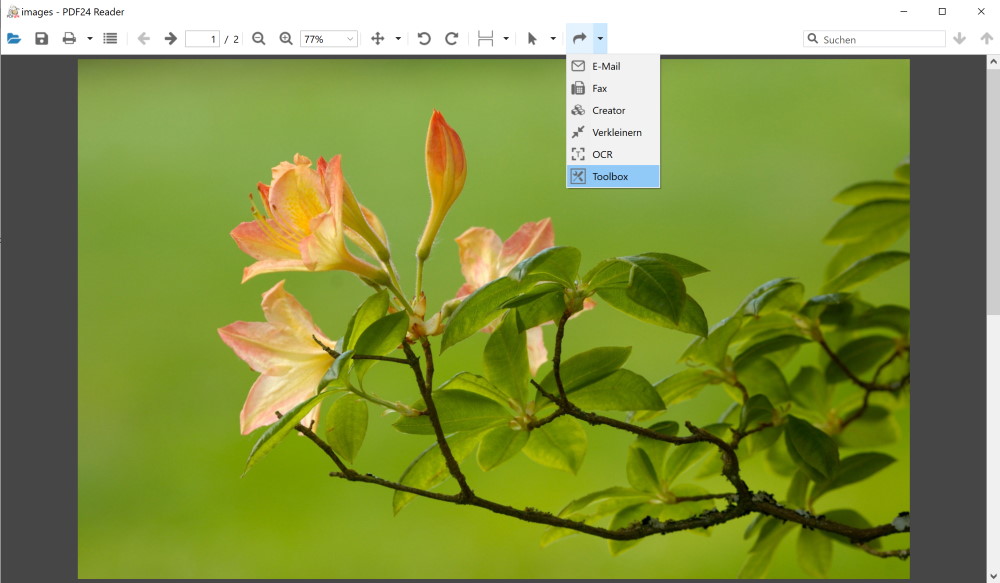
No, currently not possible in the reader, but you can use the forward tool icon in the toolbar of the reader to forward the file to the toolbox to edit the file there.
-
AuthorPosts